main_java
If you are interested in how to use CDI based IOC with FX Comp you might want to skip to an example
FX Comp Demo - Empty
This application demonstrates how to get a minimal FX Comp driven application up and running with minimum effort. Many times it is sufficient to simply subclass from classes defined by FX Comp architecture.
View
The class definition for the component’s view below is empty except for the extends clause. By extending DefaultFXCView a complete default implementation for FXCView is available immediately.
package de.ruu.lib.fx.comp.demo.empty;

import de.ruu.lib.fx.comp.DefaultFXCView;

public class Empty extends DefaultFXCView { }
Controller
Same as the view class definition the controller definition is also (nearly) empty. Extending an empty DefaultFXCViewController does not bring in many functionality but helps to tie the controller to the corresponding view via internal mechanisms in DefaultFXCView. This results in having a valid match of view and controller without further ado.
package de.ruu.lib.fx.comp.demo.empty;

import de.ruu.lib.fx.comp.FXCViewController.DefaultFXCController;
import javafx.fxml.FXML;

class EmptyController extends DefaultFXCViewController
{
	@Override @FXML protected void initialize() { }
}
App
No surprise here either: To start up a Java FX application that runs a FX Comp component it’s sufficient to subclass from FX App.
package de.ruu.lib.fx.comp.demo.empty;

import de.ruu.lib.fx.comp.FXCApp;

public class EmptyApp extends FXCApp { }
FX Comp Demo - Composing Applications from a hierarchy of FX Comp components
This chapter describes a simple scenario where two FXComp components are composed to build a third FXComp component.
Layout - Create and Maintain FXML configuration with visual editor
The picture below shows a very simple layout configuration. There are two buttons and a Java FX AnchorPane
called main.
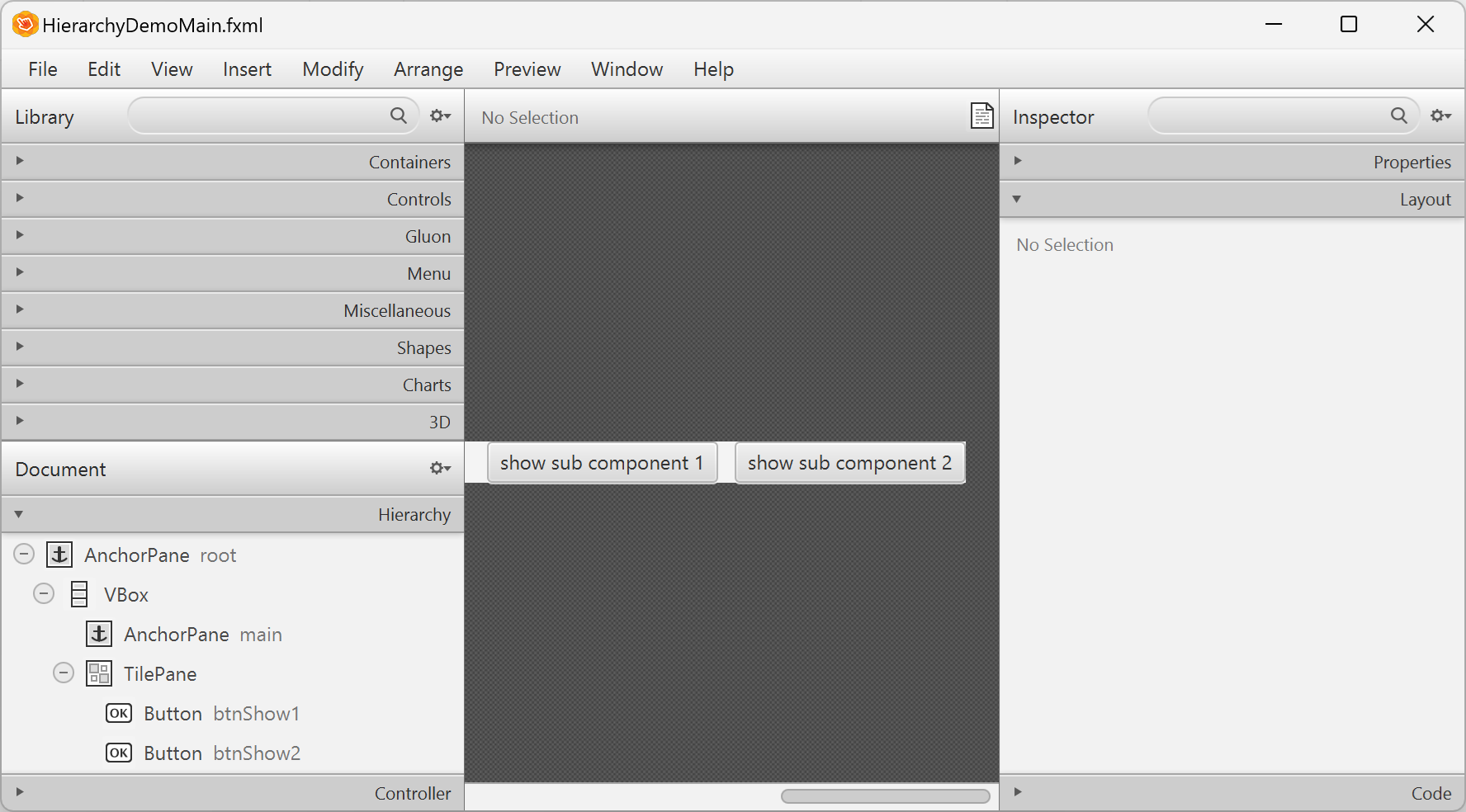
Controller
The following code shows, how action methods (onBtnShow1, onBtnShow2) repopulate the Java FX AnchorPane main with a new Java FX components (sub1 and sub2).
Note the elegance of how Java FX controller classes can make use of two different versions of inversion of control (IOC): Java FX loader takes care of initialisation for all relevant Java FX controls and containers while CDI manages the instance values of custom FX Comp components such as sub1 and sub2.
package de.ruu.lib.fx.comp.demo.hierarchy;

import de.ruu.lib.fx.comp.FXCViewController.DefaultFXCController;
import de.ruu.lib.fx.comp.demo.hierarchy.sub1.HierarchyDemoSub1;
import de.ruu.lib.fx.comp.demo.hierarchy.sub2.HierarchyDemoSub2;
import jakarta.inject.Inject;
import javafx.event.ActionEvent;
import javafx.fxml.FXML;
import javafx.scene.control.Button;
import javafx.scene.layout.AnchorPane;
import javafx.stage.Stage;
import lombok.extern.slf4j.Slf4j;

@Slf4j
public class HierarchyDemoMainController extends DefaultFXCViewController
{
	@FXML private AnchorPane root;
	@FXML private AnchorPane main;
	@FXML private Button btnShow1;
	@FXML private Button btnShow2;

	@Inject private HierarchyDemoSub1 sub1;
	@Inject private HierarchyDemoSub2 sub2;

	@Override @FXML protected void initialize()
	{
		main.getChildren().add(sub1.getLocalRoot());

		btnShow1.setOnAction(e -> onBtnShow1(e));
		btnShow2.setOnAction(e -> onBtnShow2(e));
	}

	private void onBtnShow1(ActionEvent e)
	{
		main.getChildren().removeAll(main.getChildren());
		main.getChildren().add(sub1.getLocalRoot());
	}

	private void onBtnShow2(ActionEvent e)
	{
		main.getChildren().removeAll(main.getChildren());
		main.getChildren().add(sub2.getLocalRoot());
	}
}